

Key takeaways
- Five padded, non-mesh ergonomic chairs for long coding sessions, compared on lumbar control, seat depth, arm adjustment and upholstery, with ASINs.
Coding asks something specific from a chair: hours of near-still sitting, broken by small shifts between typing, reading output and leaning back to think through a problem. For developers who dislike the firm, hammock-like feel of mesh, the real decision is which padded chair still offers genuine ergonomic adjustment — adjustable lumbar pressure, seat depth that matches leg length, and arms that meet a keyboard tray without forcing shrugged shoulders.
This shortlist serves programmers who work full days at one workstation, pair programmers who alternate between upright typing and reclined review, and home-office coders replacing a dining chair. Every pick is fully upholstered in fabric or leatherette over foam, and each was chosen from the names and specification fields on its Amazon product page.
Quick Picks
As an Amazon Associate we earn from qualifying purchases
| Product | Best for | Key spec from title |
|---|---|---|
| Steelcase Leap Office Chair, Onyx | Coders who fine-tune lumbar pressure daily | 4D adjustable arms |
| Steelcase Gesture Office Chair, Graphite Gray Fabric | Desk setups with several devices in rotation | 360-degree arms |
| Herman Miller Embody, Black Rhythm | Long sessions with frequent posture shifts | Fully adjustable arms |
| Secretlab Titan Evo, Black3 Fabric | Taller coders who recline between tasks | 4-way lumbar support |
| Razer Iskur V2 X, Black | A first padded ergonomic chair for a home desk | 152-degree recline |
How to Choose
Lumbar control you can adjust, not just lean against
A fixed lumbar bump helps only if it happens to land where your lower back curves. During a long debugging session you will sit upright, perch forward and recline, and a static pad supports just one of those positions. Look for a mechanism you can change: the Leap pairs height-adjustable lumbar support with a separate lower back firmness dial, while the Titan Evo builds a four-way adjustable lumbar system into the backrest. The Iskur V2 X takes the opposite route with a fixed integrated arch, which is simpler but gives you nothing to tune if the curve misses your spine.
Seat depth matched to your legs
When the seat pan runs too deep, its front edge presses behind your knees and you end up perched on the front half, abandoning the backrest entirely. Too shallow, and your thighs lose support before lunch. Programmers with shorter legs should prioritise a sliding seat or a listed seat depth near their measurement: the Embody lists adjustable seat depth, and the Leap listing gives a seat depth of 18.75 inches. Measure from your back against a wall to the crease behind your knee, then leave roughly two fingers of clearance when comparing that figure with any listing.
Armrests that meet the keyboard, not the desk edge
Typing with unsupported forearms loads the shoulders, yet armrests set too high push them upward instead. Four-way arms, like those on the Leap and the Titan Evo, move in height, width, depth and pivot, so the pads can sit under your elbows while your hands stay on the home row. The Gesture goes further with arms described as rotating through 360 degrees, useful when you swing between keyboard, drawing tablet and phone. Whatever the mechanism, confirm the pads can drop low enough to slide under your desktop without scraping.
Upholstery material and foam behaviour over a full day
Fabric, leatherette and coated textiles behave differently across an eight-hour sit. Woven fabric such as the Leap’s polyester upholstery and the Embody’s Rhythm fabric breathes and grips clothing, which keeps you from sliding during recline. Leatherette, used on some chairs in this category, wipes clean but can feel warm in an unconditioned room. Foam matters as much as the cover: cold-cure and high-density foams, both named in listings below, hold their shape under the sit bones longer than soft comfort foam, which can bottom out by mid-afternoon.
The 5 Best Options
Steelcase Leap Office Chair, Onyx

If your back pain follows a pattern — fine in the morning, aching by the third stand-up — the Leap is the pick built around correcting it. Its LiveBack backrest changes shape as you move, and a dedicated dial sets how firmly the lumbar zone pushes back, so support stays consistent whether you are typing upright or leaning back to read a pull request. The seat also glides forward as you recline, keeping your eyes level with the monitor and your hands close to the keyboard instead of stretching for both.
Specs
- Upholstery: 100% polyester fabric, Onyx
- Fill material: Foam
- Form factor: Upholstered, solid back
- Lumbar: 3D LiveBack technology with lower back firmness dial
- Recline: Natural Glide System, seat glides as you recline
- Arms: 4D adjustable arms
- Adjustability: Seven points of adjustability, including height and lumbar
- Seat depth: 18.75 inches
- Maximum weight recommendation: 400 pounds
- Dimensions: 24.75 x 27 x 43.5 inches
- Warranty: 12-year Steelcase factory warranty
Best for: Developers who want to dial lumbar firmness precisely and keep that setting for years.
Watch out for: Many independent sellers list this chair on Amazon and not all are authorised Steelcase resellers, so confirm the seller and that the 12-year factory warranty applies before ordering.
ASIN: B006H1QYBA
Steelcase Gesture Office Chair, Graphite Gray Fabric

The Gesture suits coders whose workstation involves more than a keyboard: a test phone in one hand, a tablet propped beside the monitor, a notebook for sketching data flows. Its arms rotate through a wide range to support forearms in those varied positions instead of only straight-ahead typing, and the contoured back is shaped to follow the spine’s natural curve. All of the main adjustments sit on the right side within arm’s reach, so you can change recline or seat position mid-task without standing up and hunting for levers underneath the chair.
Specs
- Upholstery: Graphite gray fabric
- Arms: 360-degree arms
- Back: Contoured back shaped to the spine’s natural form
- Recline: Full recline range with three settings and upright back lock
- Controls: Intuitive adjustments located on the right side
- Casters: Wheels for carpet
- Use case in listing: Designed for users who sit for long periods
Best for: Programmers who rotate between keyboard, phone and tablet throughout the day.
Watch out for: This listing ships with carpet casters, so if your workstation sits on hardwood or laminate, confirm the caster type on the page or plan for a chair mat to protect the floor.
ASIN: B016OIF2JU
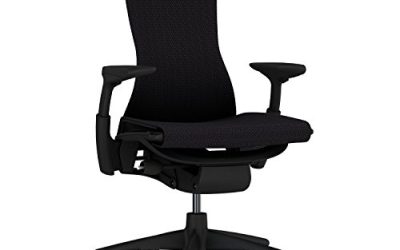
Herman Miller Embody, Black Rhythm

The Embody is aimed at restless sitters — the kind of coder who crosses a leg, perches on the seat edge during a call, then settles back to review logs. Its seat and back use a matrix of small supporting elements that flex independently, spreading weight as you shift instead of holding one rigid contour. The Backfit adjustment sets the backrest to follow your spine’s natural curve, after which the back moves with you. Rhythm fabric keeps the contact surface smooth and helps limit heat build-up during long sessions in a warm room.
Specs
- Upholstery: Rhythm fabric, Black
- Back: Central spine with flexible ribs, Backfit adjustment
- Support system: Pixelated Support across seat and back surfaces
- Seat construction: Four different support layers
- Seat depth: Adjustable
- Arms: Fully adjustable arms
- Tilt: Tilt limiter
- Frame and base: Graphite frame and base
- Casters: Carpet casters
Best for: Coders who change position constantly and want support that follows without manual readjustment.
Watch out for: The listing’s support layers are designed for airflow, but the seat feel is firmer and more structured than a thick foam cushion, so confirm the return terms on the page if you prefer a plush sit.
ASIN: B01DGM7ZII
Secretlab Titan Evo, Black3 Fabric
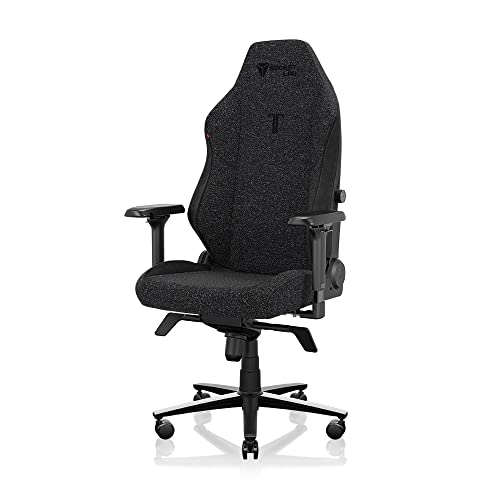
Built on a gaming-chair frame but upholstered in woven SoftWeave fabric rather than vinyl, the Titan Evo fits taller programmers who find standard task chairs short in the back. The full-length backrest reclines to 165 degrees for thinking breaks, the built-in lumbar adjusts four ways, and a magnetic memory foam head pillow snaps onto the backrest for neck support during code review. The cold-cure foam seat is moulded as one piece, which resists the uneven sagging that glued foam layers can develop. Size Regular is the configuration on this listing.
Specs
- Upholstery: SoftWeave fabric, Black3
- Form factor: Upholstered
- Seat material: Memory foam; cold-cure foam construction
- Lumbar: 4-way built-in adjustable lumbar support
- Headrest: Magnetic memory foam head pillow
- Arms: Full-metal 4D armrests with replaceable armrest tops
- Recline: 165 degrees, multi-tilt mechanism
- Dimensions: 19.3″D x 22″W x 51.2″H
- Seat depth: 19.3 inches
- Maximum weight recommendation: 285 pounds
- Item weight: 75.9 pounds
- Model: M07-E24SW-BLCK33R, Size Regular
Best for: Taller developers who want a high backrest, deep recline and fabric rather than leatherette.
Watch out for: The listing describes Size Regular as recommended for people between 5’7″ and 6’2″, so if you fall outside that range, confirm you are ordering the size whose dimensions match you before checkout.
ASIN: B0B3RH59X8
Razer Iskur V2 X, Black

The Iskur V2 X is the straightforward route into a padded ergonomic chair for a home coding desk. Its backrest carries an integrated lumbar arch that holds a neutral lower-back curve without any dials to set, and the widened seat base has reduced edges that guide you toward the centre of the cushion. The contoured high-density foam is firmer than typical budget padding, which helps it keep its shape through long sessions. Upholstery is a multi-layered plush fabric that stays cooler against the skin than the synthetic leather used on many chairs at this level.
Specs
- Upholstery: Multi-layered plush fabric finish, Black
- Lumbar: Built-in lumbar support with integrated arch
- Seat: Widened seat base with reduced edges
- Cushions: Contoured high-density foam cushions
- Recline: Adjustable up to 152 degrees
- Arms: 2D armrests, adjustable in height and rotation
- Dimensions: 27.58″D x 27.58″W x 49.64″H
- Seat depth: 18.9 inches
- Maximum weight recommendation: 299 pounds
- Model: Iskur V2 X
Best for: Home-based coders moving up from a basic task chair who want fixed, set-and-forget lumbar support.
Watch out for: The lumbar arch is built in rather than adjustable, and the armrests move in two directions only, so confirm from the listing’s dimensions that the fixed curve and arm range suit your build.
ASIN: B0DP5SY554
Which One Fits Your Situation
You sit for ten-hour stretches and your lower back complains first
Start with the Steelcase Leap. The firmness dial is the difference-maker here: you can increase lumbar pressure on days when your back feels fragile and soften it when you are sitting well. The gliding seat keeps your posture connected to the desk through reclines, so long review sessions do not slowly pull you out of position.
Your desk holds a keyboard, a phone and a tablet in constant rotation
Choose the Steelcase Gesture. Arms that rotate through a wide arc support your forearms when you turn toward a second device, instead of leaving one elbow hanging. Controls grouped on the right side mean quick adjustments between tasks, and the fabric upholstery avoids the sticky feel of coated surfaces during a long day.
You fidget, perch and shift position every few minutes
The Herman Miller Embody matches that working style. Its flexing support matrix responds to micro-movements without you touching a lever, and the Backfit setting aligns the backrest to your spine once, then lets it travel with you. If a chair that demands constant manual tuning annoys you, this is the one designed to need the least.
You are tall and want to lean back properly between tasks
Look at the Secretlab Titan Evo in Size Regular. The tall backrest, magnetic head pillow and 165-degree recline support a genuine lean-back for reading documentation or thinking through an architecture problem, while the woven fabric keeps the contact points breathable instead of trapping heat. Check the listing’s size guidance against your height first.
Common Mistakes
- Buying a padded chair with no lumbar adjustment because the showroom sit felt soft; softness fades within an hour, while support settings matter at hour six.
- Ignoring seat depth and ending up perched on the front edge, which disconnects your back from the backrest and negates the chair’s ergonomic design.
- Setting armrests once and never revisiting them after changing desk height, monitor position or keyboard tray, leaving shoulders raised all day.
- Choosing leatherette for a warm, unconditioned room without considering fabric, then sliding and sticking through summer coding sessions.
- Assuming every seller of a premium brand chair is an authorised reseller, which can leave the long factory warranty in doubt.
Frequently Asked Questions
Is an upholstered chair better than mesh for coding?
Neither is automatically better; they suit different sitters. Upholstered chairs give a cushioned, grippy surface that many developers prefer for still, focused typing, and fabric versions breathe reasonably well. Mesh runs cooler and feels firmer. If you dislike a suspended, hammock-like seat, a padded chair with real lumbar and seat-depth adjustment is usually the more comfortable long-term match.
How much adjustment does a coding chair actually need?
Prioritise four things: seat height, lumbar support you can position or firm up, seat depth that leaves clearance behind your knees, and armrests that meet your forearms at keyboard height. The Leap covers all four with separate controls. Extra features help, but a chair missing seat-depth or lumbar adjustment will bother you daily, however premium its materials feel.
Can a gaming-style chair work as a full-time coding chair?
Yes, provided the ergonomic hardware is real rather than decorative. The Titan Evo and Iskur V2 X in this list have built-in adjustable or integrated lumbar support, recline mechanisms and structured foam, which are the elements that matter across a workday. Check the listing for those features and the stated weight limit instead of judging by the racing-style shape alone.
How long should an upholstered ergonomic chair last?
The frame and mechanism should outlast the foam and fabric. The Leap listing carries a 12-year Steelcase factory warranty, which signals how the maker rates its structure. Foam compresses gradually with daily use, so a chair that still adjusts correctly but feels thinner under the sit bones after several years is showing normal wear, not a defect.
More from Amazon
Programs that pair well with the guide above. Offers and eligibility are set by Amazon and may change.
Set up recurring deliveries of everyday items on eligible products. Terms and savings are set by Amazon.
Explore Subscribe & SaveFree shipping on eligible items, Prime Video and more. Eligible new members can start with a free trial.
Start a Prime free trialA Prime membership for ages 18-24 with a trial period. Eligibility is set by Amazon.
See Prime for Young AdultsAudiobooks and podcasts to listen to on the go. Eligible new members can start with a free trial.
Try Audible freeAs an Amazon Associate we earn from qualifying purchases.

Write Your Review
No reviews yet. Be the first to share your experience!