

Key takeaways
- Height: Sets the pad so your shoulders can relax. Too high pushes shoulders up; too low makes you lean.
- Width: Moves the arms in or out, so they fit a narrower or broader frame and clear the desk edge.
- Depth: Slides the pad forward or back, which helps when typing close to the keyboard or when leaning in to read.
- Pivot: Angles the pad inward, supporting forearms during typing and mouse use.
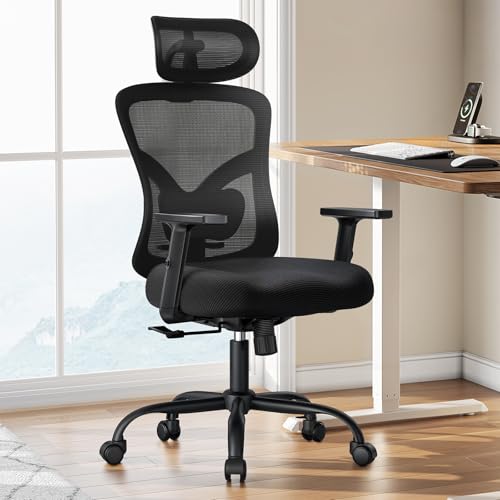
If you want armrests that genuinely follow your elbows, the Sihoo Doro C300 is the budget-to-mid pick with true 4D arms, the Steelcase Series 2 or Branch Ergonomic Chair Pro suit the mid-range, and the Steelcase Gesture or Leap are the premium choices for people who want the most freedom of movement. Choosing the right chair comes down to how many directions the arms move, whether they clear your desk, and whether the rest of the chair fits your body. This guide uses maker details and independent reviewers such as CNN Underscored, Forbes and Stand Desk Lab to compare the leading options.
Our top picks



As an Amazon Associate we earn from qualifying purchases at no extra cost to you.
At a glance: office chairs with adjustable arms
| Chair | Best for | Armrest adjustment reported | Other stated points / limits |
|---|---|---|---|
| Sihoo Doro C300 | Value, most people | 4D: height, width, depth, pivot (Stand Desk Lab) | Self-adaptive lumbar, 330 lb capacity per one reviewer; mesh less durable than premium brands |
| Sihoo Doro C300 Pro V2 | Users at the edges of average proportions | 8D per Stand Desk Lab | Adjustable seat depth of 16.8 to 17.8 inches |
| Branch Ergonomic Chair | Longer warranty, tidy design | Height, width, pivot (3D per Stand Desk Lab) | CNN Underscored calls it a favorite budget option with adjustable seat depth and lumbar |
| Branch Ergonomic Chair Pro | Mid-range arm flexibility | Described as 5D arms by a roundup | Mid-range tier |
| Steelcase Series 1 | Compact frame with 4D arms | 4D | Mid-range tier |
| Steelcase Series 2 | Full-mesh back, long warranty | 4D | 400 lb capacity and 12-year warranty per a roundup |
| Steelcase Gesture | Maximum arm movement | Forbes names it best for armrests, with a 360-degree arm system | Premium tier |
| Steelcase Leap V2 | Long-hours support | 4D arms as standard tier | Premium tier |
| Autonomous ErgoChair Pro | Mid-range alternative | 4D: height, width, depth, pivot | Mid-range tier |
| Herman Miller Aeron | Classic mesh design | Height and pivot, not width, by design (Stand Desk Lab) | Premium tier |
Model names and options change, so match the exact version on the maker’s page before choosing.
What the numbers mean
Stand Desk Lab explains the shorthand. A 2D armrest adjusts in height only, and this is the standard on entry-level chairs. A 4D armrest adds pivot angle and depth or width. An 8D system provides finer increments within those same four axes rather than entirely new movements. The same outlet argues that 4D is the level that matters for most users, since it lets the pad meet your elbow at your actual keyboard position, and that going beyond 4D mostly benefits people whose proportions fall outside the average.
The Herman Miller Aeron is a useful reminder that more axes are not always the goal. Stand Desk Lab notes it adjusts only height and pivot, not width, and describes that as a deliberate design choice. The takeaway is to look at what each axis does for your sitting position, not just a number on a listing.
What each adjustment does
- Height: Sets the pad so your shoulders can relax. Too high pushes shoulders up; too low makes you lean.
- Width: Moves the arms in or out, so they fit a narrower or broader frame and clear the desk edge.
- Depth: Slides the pad forward or back, which helps when typing close to the keyboard or when leaning in to read.
- Pivot: Angles the pad inward, supporting forearms during typing and mouse use.
When shopping, find out whether arms are attached to the seat or the backrest. Seat-mounted arms stay in place as you recline. Back-mounted arms follow the backrest, which some users prefer for tilting.
Budget tiers
Budget and upper budget
The Sihoo Doro C300 and Branch Ergonomic Chair are the names reviewers mention most. Stand Desk Lab says real 4D adjustment is uncommon on chairs below roughly the upper budget range, so shoppers looking at very cheap chairs with advertised adjustable arms should read the listing to see which axes move. Other lower-cost chairs such as the COLAMY Atlas and the CAPOT ergonomic mesh chair are described in a roundup as offering 4D arms, with the CAPOT listing a 400 lb capacity, though these come from retailer-style roundups and are less well established than the others.
Mid-range
The Steelcase Series 1 and 2, Branch Ergonomic Chair Pro and Autonomous ErgoChair Pro occupy this tier. This is where long warranties, sturdier mechanisms and consistent 4D arms become common.
Premium
The Steelcase Gesture and Leap, Herman Miller Embody and Aeron are the names that lead premium lists. Forbes highlights the Gesture for arm adjustability. They suit people who sit at a desk for many hours each day and want long-term build quality.
Fit and compatibility notes
Desk clearance
Arms that adjust in width and height can usually be lowered or tucked to slide under the desk. If your desk has a low apron or keyboard tray, measure the gap between the floor and the underside, and compare it to the arm height at its lowest setting.
Body size
Smaller users should check the minimum arm height and seat height, since arms that do not drop low enough defeat the purpose. Larger users should check the weight capacity and the seat width, as well as how far apart the arms can go.
Seat depth and lumbar
Arms are only part of the fit. The Sihoo Doro C300 Pro V2 adds seat depth adjustment, and the Branch chair lists depth and lumbar adjustment. A chair with good arms but a seat that is too deep for you will still be uncomfortable.
Setting arms correctly
A common approach is to set the arm pad so that your forearms rest lightly with your shoulders relaxed and your elbows near a right angle, then pivot the pads slightly inward for typing. If you have persistent pain, numbness or tingling, talk with a doctor or physical therapist rather than relying on equipment changes alone.
Pick X if… decision table
| Pick this | If your situation is |
|---|---|
| Sihoo Doro C300 | You want real 4D arms without a premium outlay |
| Sihoo Doro C300 Pro V2 | Your proportions fall outside average and you want finer steps and seat depth |
| Branch Ergonomic Chair | You value a longer warranty and a simple look |
| Steelcase Series 2 | You want 4D arms, a full-mesh back and long coverage |
| Steelcase Gesture | You change positions often and want the most arm freedom |
| Herman Miller Aeron | You prefer a classic mesh design and are comfortable without width adjustment |
Care and use
Tighten arm bolts periodically, since loose arms are the most common squeak source. Wipe pads with a damp cloth and mild soap; replace pads if they crack. Do not sit on the arms or use them to lift the chair. Keep weight within the maker’s rating, and follow the manual when changing settings so that locking levers click fully into place.
Common mistakes when buying for the arms
The first mistake is assuming that any listing with the word adjustable describes movement in several directions. Many entry-level chairs only raise and lower the pads, which is the 2D standard Stand Desk Lab describes, so read the specification list for words like pivot, depth and width. The second mistake is buying for the armrests and ignoring the rest of the chair. A chair with excellent arms but a seat that is too deep, or a back that does not reach your shoulder blades, will still leave you shifting around. The third is forgetting that arm pads wear out; soft polyurethane pads can crack after years of use, and some makers sell replacements while others do not, so look at the parts policy.
It also helps to think about how you work. Someone who types most of the day benefits from pads that pivot inward and slide forward. Someone who mostly uses a mouse may want the pad width set so the mouse arm is supported without pushing the shoulder outward. People who switch between a laptop and a desktop setup often like arms that can be lowered quickly, which is another reason that easy-to-use levers or dials, rather than tools, matter in a daily-use chair.
Alternatives
- Flip-up arms: Useful if you need to roll the chair completely under the desk.
- Armless task chairs: Preferred by some for freedom of movement, though they provide no forearm support.
- Add-on armrest pads or desk-edge supports: A way to improve a chair that otherwise suits you.
Frequently Asked Questions
What does 4D armrest mean?
It means the armrest moves along four axes. Stand Desk Lab describes this as height and width plus pivot and depth, so the pad can meet your elbow in your real typing position.
Is 8D better than 4D?
Not necessarily. Stand Desk Lab says 8D gives finer steps within the same movements and mainly helps people with unusual proportions.
Can a cheap chair have good adjustable arms?
Some can. Reviewers cite the Sihoo Doro C300 as a lower-priced example, though true 4D arms are described as uncommon at the cheapest levels.
How high should armrests be set?
A common guideline is to let your forearms rest lightly with relaxed shoulders. If you feel strain, adjust gradually and consult a professional for persistent discomfort.
Do adjustable arms fit under any desk?
Not always. Measure desk clearance and compare it with the lowest arm setting listed by the maker.
Are premium chairs worth it for the arms alone?
Probably not by themselves. Premium chairs add build quality, warranty and overall adjustment, so weigh the full package rather than the armrests alone.








Write Your Review
No reviews yet. Be the first to share your experience!