

Key takeaways
- Thin pads, around a few millimetres, add warmth without changing your seating height or posture.
- Padded cushions around 1.6 inches thick, such as the SoliSnug and HotCalyto, add comfort but raise your seat slightly and can change how your feet reach the floor or how your knees meet the desk.
- Non-slip bases or straps help the pad stay put on slick leather or mesh. If a pad slides, it can bunch up, and bunched heating elements are something makers generally warn against.
- Contoured designs with lumbar support, like the VanBoLon, work best on flat or very upright chairs. On a chair with a built-in lumbar curve they may fight it.
For most desk workers, a wired 12V heated seat cushion with several heat levels and a long adjustable timer is the safest all-round choice, a USB pad suits people who only want mild warmth and an easy cable, a battery-powered pad suits anyone who moves between rooms, and a combined heat-and-vibration back cushion is for people who also want a lumbar massage feature. Everything below is drawn from maker descriptions and published roundups, so treat the stated specs as the manufacturers’ claims rather than measured results.
Our top picks
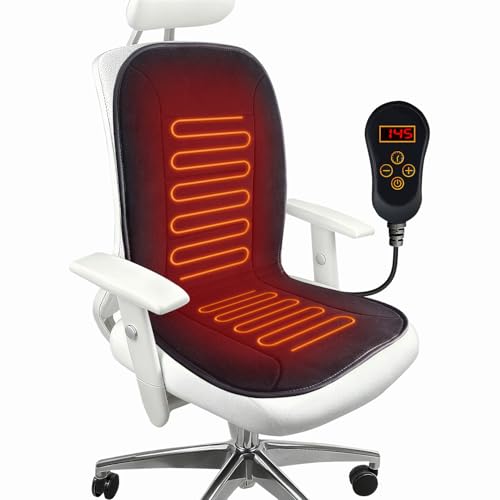


As an Amazon Associate we earn from qualifying purchases at no extra cost to you.
Quick comparison of the main office chair heating pad types
| Product or type | Best for | Stated specs (as listed by makers or roundups) | Limits |
|---|---|---|---|
| SoliSnug 12V cushion | Adjustable warmth, long workdays | Seven heat levels, 13 timer settings including an always-on mode, about 1.6 inches of padding | Corded, needs a wall adapter, no battery option |
| MAXCOM 12V cushion | Warming back, hips and thighs | Seven levels, timer from one to twelve hours, overheat protection listed | Cord limits movement, no battery |
| HotCalyto 12V cushion | Extra padding plus heat | Seven levels in a range of roughly 85 to 145 degrees Fahrenheit, memory function, memory foam core, non-slip base | Bulkier than thin pads, controller on a cord |
| FAYKONCEN dual-zone cushion | Heating the back and seat separately | Two heating zones, 90-minute auto-shutoff listed in roundups | Shorter automatic cutoff means you restart it during long sessions |
| VanBoLon lumbar-shaped cushion | Lower-back contour with warmth | Ergonomic shape paired with heating | Shape may not suit every chair |
| Snailax heat and vibration cushion | Warmth plus vibration massage | Quick warm-up and vibration described by reviewers | Vibration can be distracting in meetings |
| Thin USB seat pad | Travel, light warmth, shared desks | 5V USB, five levels, timer up to four hours, fleece top as listed in one roundup | Mild heat, no lumbar support |
| Battery-powered seat pad | Cord-free use | 10,000mAh rechargeable battery, up to ten hours of use stated | Large and heavier, awkward on small chairs |
Which type of power source fits your desk?
The power source decides more about daily comfort than the brand does. Most full-size office chair cushions run on 12V through a wall adapter. That supports higher heat output and longer timers, which is why roundups keep returning to models such as the SoliSnug, MAXCOM and HotCalyto. The trade-off is a cord that runs from the chair to the wall. If your chair swivels or rolls, the cable can wrap around the base, so route it carefully and leave slack.
USB pads draw 5V and are intended for lighter warmth. They are handy where you can plug into a monitor hub or laptop, and one roundup lists a fleece-topped USB model with five levels and a timer up to four hours. Reviewers describe the heat as mild, which is fine for taking the chill off a leather or mesh seat but may disappoint in a cold room.
Battery pads remove the cable altogether. One listed model pairs a 10,000mAh rechargeable battery with a stated usage time of up to ten hours. The cost of that freedom is bulk and weight, and roundups note that it can be awkward on a small chair. Battery run time also depends on the heat level you choose, so a maker’s maximum hours figure will normally apply to the lowest setting.
Heat levels, timers and automatic shut-off
Heat control is where cushions differ most. Several 12V models list seven levels. The HotCalyto and SoliSnug are described in roundups as spanning roughly 85 to 145 degrees Fahrenheit. A wider range is useful because the same cushion can sit low for a warm office and higher for a drafty one. Cushions with only three levels, such as one lumbar-support model in a roundup, are simpler but give you fewer choices.
Timers matter for a practical reason. If you stand up for a meeting, a timer prevents the pad from running unattended. The SoliSnug lists 13 timer settings including an always-on mode, and the MAXCOM lists a one- to twelve-hour range with overheat protection. The FAYKONCEN is reported with a 90-minute automatic shut-off. Shorter cutoffs can be annoying during a long workday but are a sensible default for a product that sits under your body.
Only rely on a safety feature if the maker states it for your exact model, and read the manual for what the label means. A line such as overheat protection in a review is a summary, not a certification. Look for the safety marks printed on the control unit or packaging for your region, and follow the instruction sheet for the power adapter that comes in the box.
Fit, size and thickness
A seat pad has to match your chair. Measure the usable seat surface and compare it with the dimensions on the listing. A square pad of about 17 inches, as in one USB model listed in a roundup, fits many standard task chairs, while the long pad of roughly 53 by 17.7 inches in a battery-powered listing is built to cover both seat and back, so it suits taller chair backs rather than compact stools.
- Thin pads, around a few millimetres, add warmth without changing your seating height or posture.
- Padded cushions around 1.6 inches thick, such as the SoliSnug and HotCalyto, add comfort but raise your seat slightly and can change how your feet reach the floor or how your knees meet the desk.
- Non-slip bases or straps help the pad stay put on slick leather or mesh. If a pad slides, it can bunch up, and bunched heating elements are something makers generally warn against.
- Contoured designs with lumbar support, like the VanBoLon, work best on flat or very upright chairs. On a chair with a built-in lumbar curve they may fight it.
Budget, mid-range and premium tiers
Budget pads are typically thin USB or basic 12V models with a handful of heat levels and a short timer. They are fine for a shared or occasional chair, but expect milder heat and less padding. Mid-range models add seven heat levels, a memory function and longer timers, which is where the SoliSnug, MAXCOM and HotCalyto sit in most roundups. Premium options bundle extras such as dual heating zones, a rechargeable battery or vibration massage. The extras only pay off if you will use them, so a plain mid-range cushion with a reliable timer often delivers the most day-to-day value.
Pick X if you …
| If you … | Pick | Why |
|---|---|---|
| Sit for hours and want to dial warmth up or down | SoliSnug or MAXCOM style 12V cushion | Seven levels and long, flexible timers |
| Want more padding as well as heat | HotCalyto style memory foam cushion | Thicker core with a non-slip base |
| Feel cold more in the back than the legs | Dual-zone cushion such as FAYKONCEN | Back and seat heat separately |
| Want lower-back shape plus warmth | VanBoLon style lumbar cushion | Contoured profile |
| Like vibration massage as an extra | Snailax style heat-and-vibration cushion | Combines both features |
| Hot-desk or travel with a laptop | Thin USB pad | Light, easy to fold, runs from a USB port |
| Hate cables on a rolling chair | Battery-powered pad | No cord, longer stated run time |
Safety and care notes
A seat heater is an electrical product that you sit on for long periods, so conservative habits matter. Use only the power adapter supplied with the cushion, keep the cord out of the wheel path, and do not fold or crease the heating element while it is switched on. Many manuals tell users not to place heavy objects on top, not to use the pad while it is wet, and to unplug it when it is not in use. If a cushion smells of burning, feels hot in one spot, or the cord is damaged, stop using it.
People with reduced skin sensation, circulation problems, or certain medical conditions are often told in heating product manuals to speak with a doctor before using direct heat. This article does not make health claims, and a heated cushion is a comfort accessory rather than a treatment. If you have ongoing back pain, see a doctor or physiotherapist rather than relying on a heated pad.
For cleaning, many cushions have a wipe-clean or lightly washable surface, while the control unit and heating element must stay dry. Follow the care label. Some covers can be spot cleaned, but machine washing is not safe for most heated pads unless the maker explicitly says so.
Alternatives to a heated cushion
- Non-heated gel or memory foam cushions. Roundups cite gel-enhanced memory foam cushions with a cooling layer and a U-shaped coccyx cutout as popular picks for comfort without heat. They suit people who run warm or sit in a heated office.
- Heated chair wraps or blankets. A throw or lap wrap warms the legs and lower body without a pad under you, which some people prefer to a cushion under their hips.
- A small desk-side heater. If the whole space is cold, an office-approved space heater with tip-over protection warms the room, though building rules may limit these. Follow the instructions and local fire-safety guidance.
- An insulated seat cover or wool pad. No power and no cord, though it only stops a seat from feeling cold rather than warming you.
Frequently Asked Questions
Can I leave a heated seat cushion on all day?
Makers vary. Some models list an always-on mode, while others use timers of 90 minutes or a few hours. Read the manual for your model and use the timer if you step away. Unplug the pad at the end of the day.
Is a 12V cushion better than a USB one?
For stronger warmth and longer timers, 12V models are usually described as more capable. USB pads are lighter and simpler, and they suit mild warmth. Pick based on how cold you get and where you can plug in.
Will a heated cushion fit my mesh chair?
Often yes, but a non-slip base or straps are important because mesh seats can let a pad shift. Measure the seat and compare it with the listed dimensions. Avoid folding the pad over sharp edges.
Are heated seat cushions safe for people with back pain or poor circulation?
Makers commonly advise people with certain conditions to talk to a doctor before using direct heat. A cushion is a comfort accessory, not a treatment. If pain continues, see a healthcare professional.
How do I clean a heated seat pad?
Wipe the surface with a lightly damp cloth if the care label allows, and keep the controller and cable dry. Do not machine wash unless the maker says it is safe. Let the pad dry fully before switching it on.
Do battery-powered pads last a full workday?
One listed model states up to ten hours of use, but run time falls as you raise the heat. Expect shorter life on higher settings, and recharge overnight.




Write Your Review
No reviews yet. Be the first to share your experience!